
What Is Linger AI Agent? Local Open-Source Personal Desktop Agent
Published · 7 min read
Linger is an open-source personal AI agent from SimplexAI that runs on your Mac, Windows PC, or Linux machine. It connects Claude Code, Codex, or Pi to a local model or your existing subscription, then adds memory, desktop control, background tasks, and a proactive assistant called Another Me. The repository went public on November 10, 2026 and had 4,711 GitHub stars on November 26. The software is free; hardware and setup time are the real costs.
In this article
What Linger is
Linger is an open-source personal AI agent from SimplexAI. It runs on your Mac, Windows PC, or Linux machine and keeps the agent, the model, and your memory on hardware you control. The repository went public on November 10, 2026 and had 4,711 GitHub stars sixteen days later.
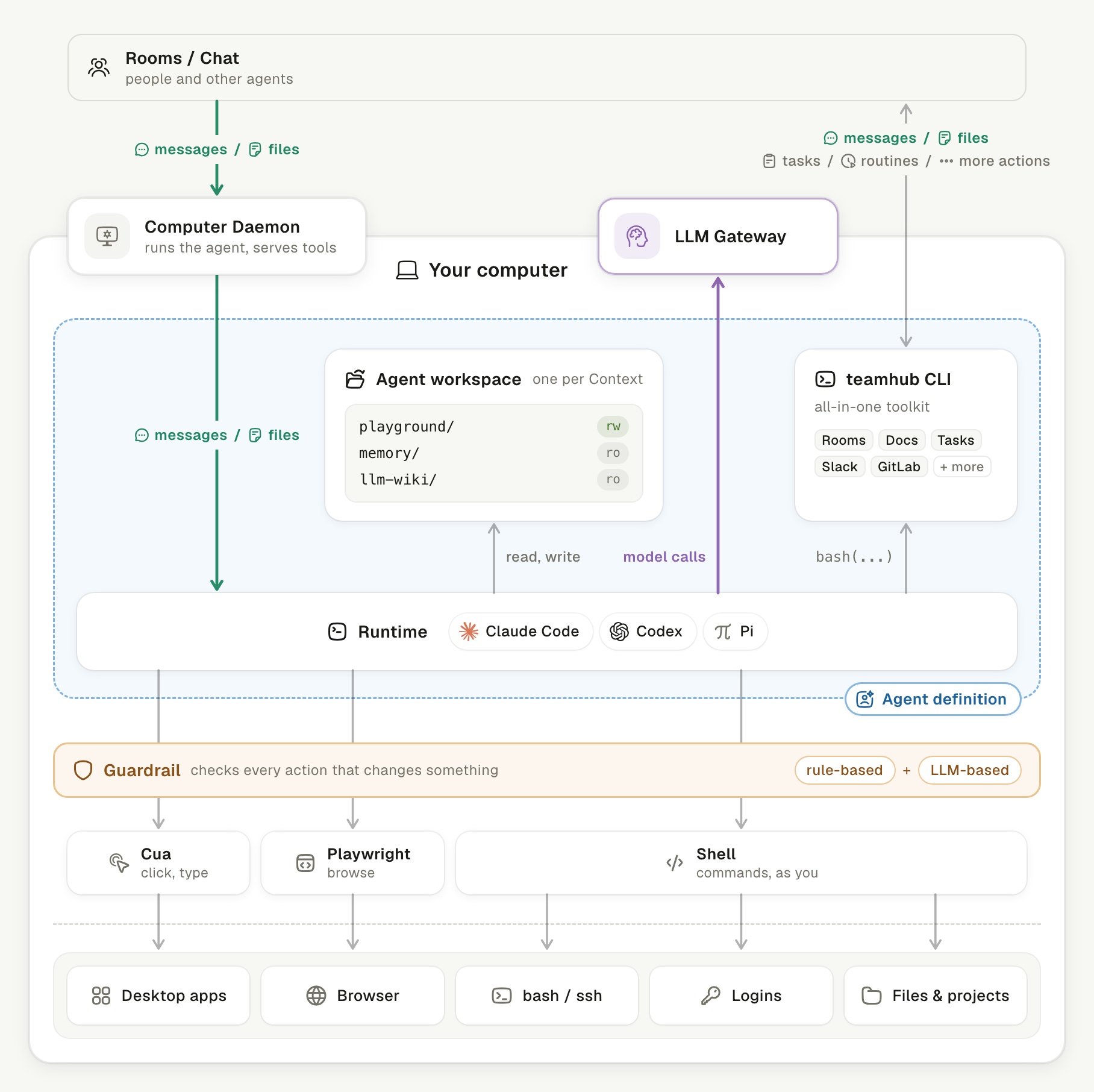
The catch is the runtime. Linger does not include Claude Code, Codex, or Pi. It finds the copy already installed and uses its sign-in. Without one, Another Me can chat but cannot open an app, read a file, or run a command.
The docs describe five layers on your machine: agents, runtimes, a gateway, local models, and your data. A cloud model joins only when you add one.
What it does
Another Me is the default agent, and it does more than answer prompts. It watches your work, keeps a memory, and asks before an action leaves the machine.
It reaches out first
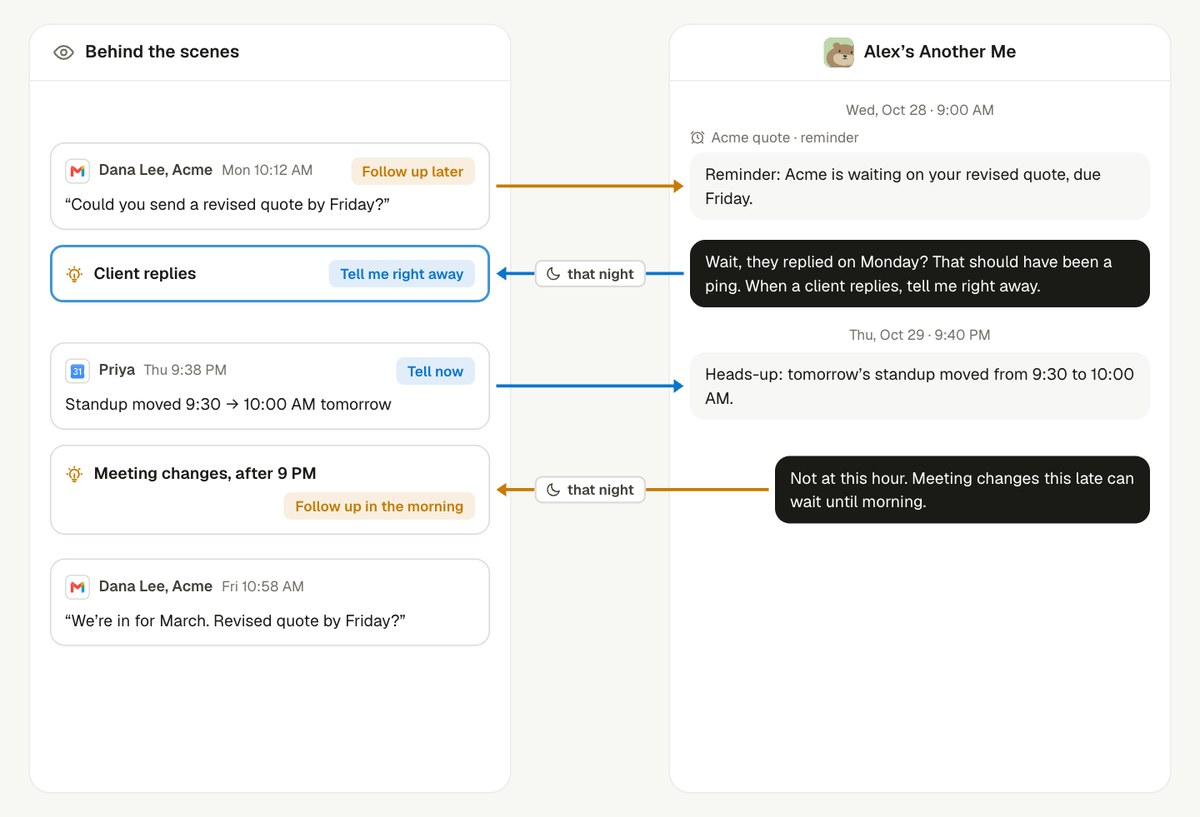
Another Me reads Gmail, Outlook, Google Calendar, and Slack, then decides whether to interrupt, wait, or stay quiet. Urgent events get through at night; routine ones become follow-ups. Each night it reads how you replied and turns repeated corrections into rules. The rules stay on your machine.
It remembers in pages
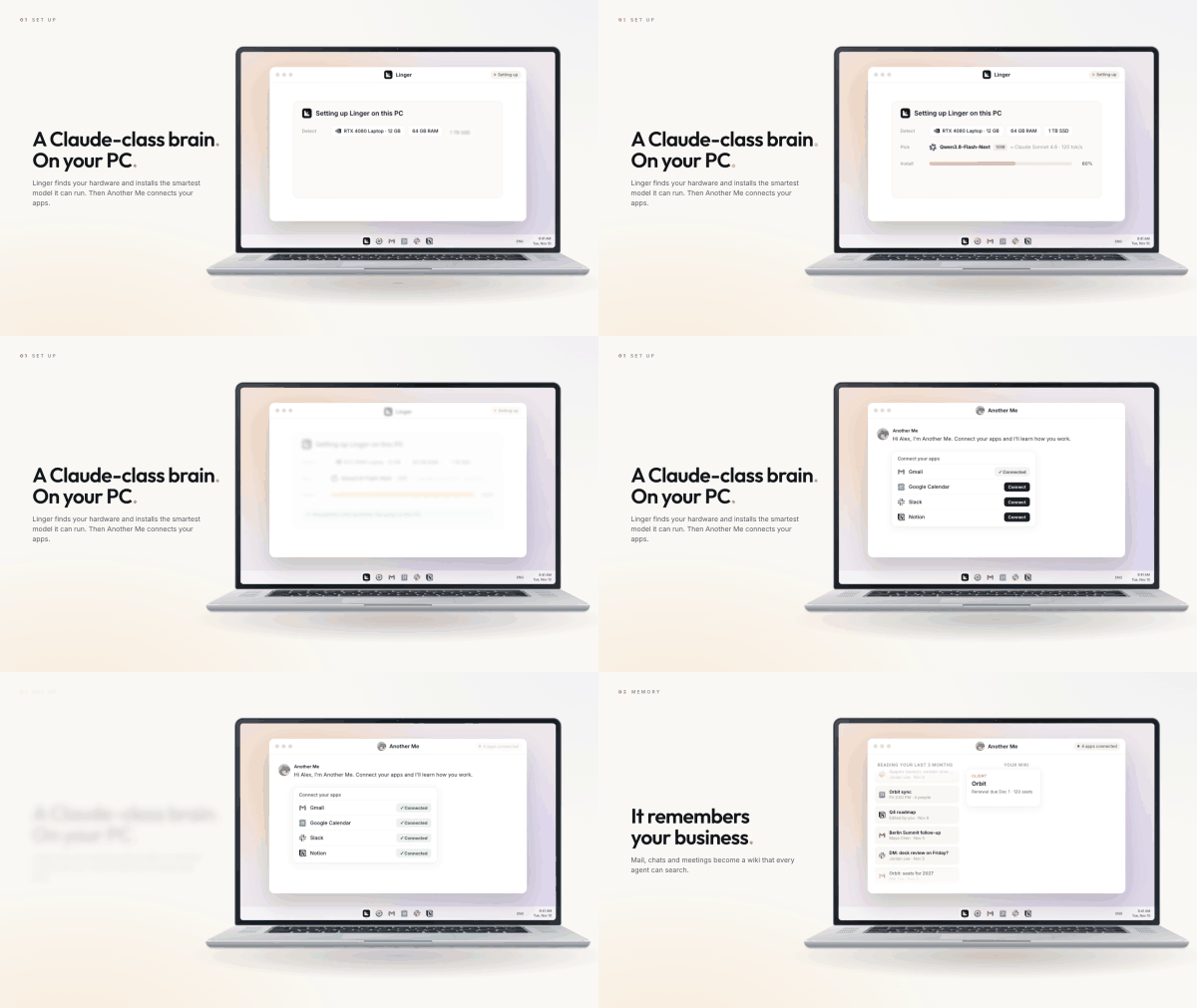
Connect an inbox and Linger reads back through recent months to start a wiki of your people, clients, and projects. Raw messages and the pages written from them are stored separately, so an agent can start with the summary and check the original sentence or number. When a fact changes, the page is rewritten and the change is logged.
It uses your desktop and signed-in Chrome
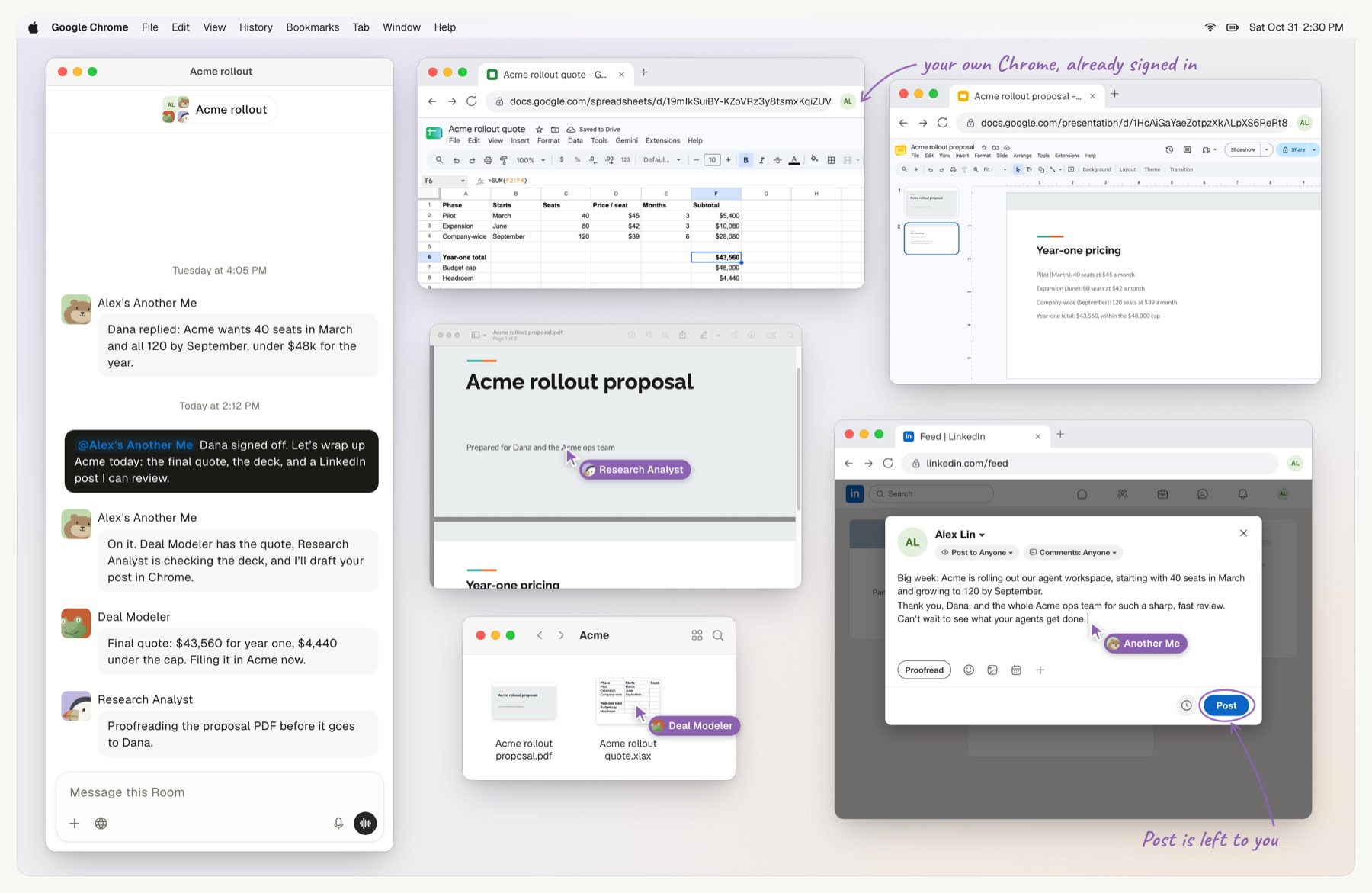
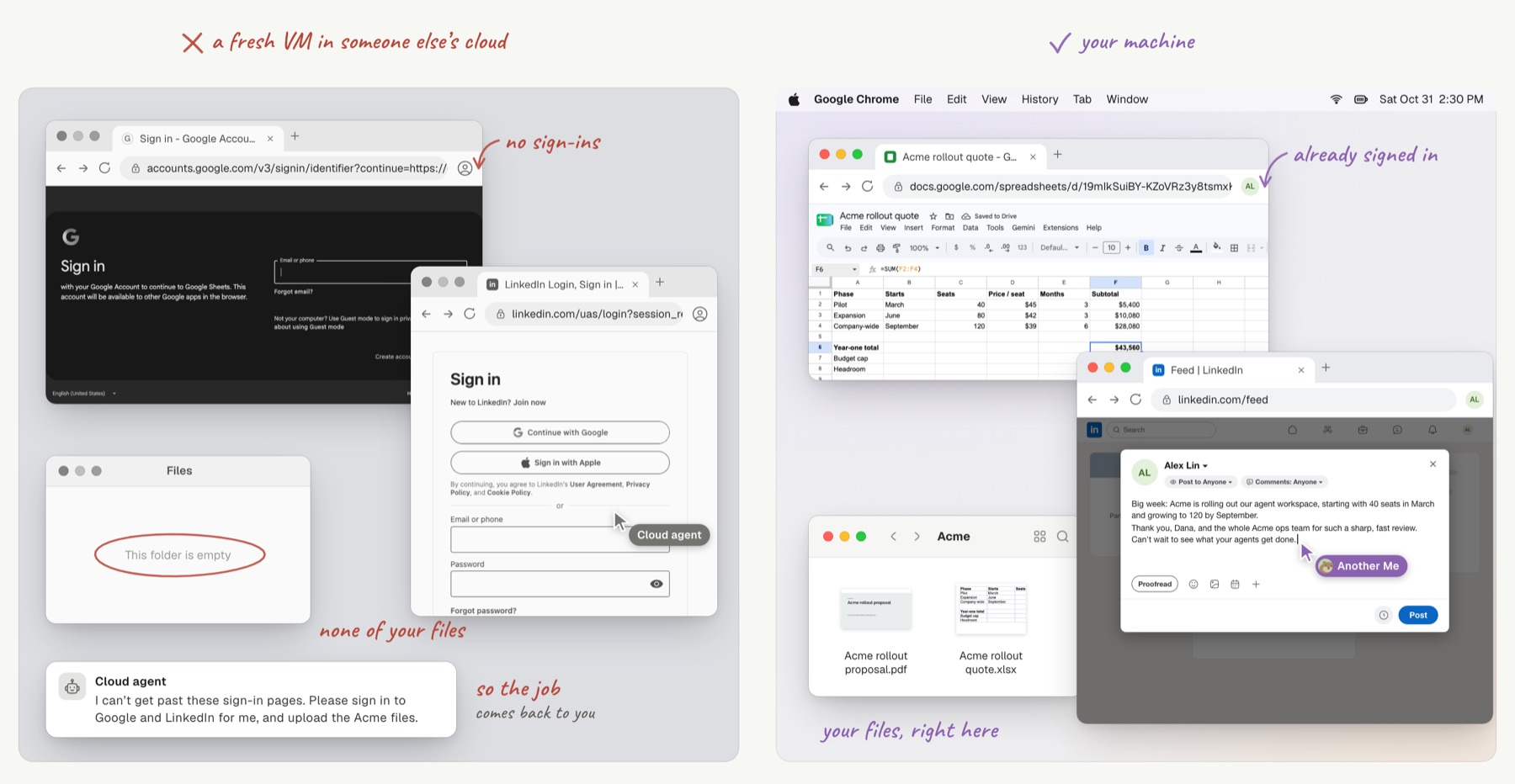
On macOS and Windows, agents open apps, read windows like a screen reader, and click and type in your signed-in Chrome. That avoids the login wall a cloud agent hits. Linger sends desktop and browser actions through one input slot, so two agents do not fight over the mouse. Linux is narrower: X11 only, and no signed-in Chrome.
It can work as a team
For a bigger job, Another Me writes a plan to team.md and publishes it to the room. Agents read their own entry and start when their inputs are ready. Long work moves to a background task, so the chat stays responsive. Writes other people will see wait for a confirmation card. The docs are clear that none of this is a sandbox. Voice and meeting capture are optional add-ons that use Soniox and xAI.
How a 125B model fits on 12 GB
Qwen3.8-Flash-Next has 125B parameters and a 3-bit file of about 55 GB. PolyStrata keeps the busiest experts on the GPU and the rest in system RAM or on the SSD. On an RTX 3060 with 12 GB of VRAM and 64 GB of RAM, the project reports 45.5 tokens per second.
That is not the default. A 12 GB NVIDIA card gets Qwen3.6-35B-A3B at Q4 unless you choose the larger model and have the RAM. Model Autopilot checks the machine and proposes a plan before anything downloads. The speed figures are the project's own measurements, not independent reviews.
What you need
Local models need an Apple silicon Mac with at least 16 GiB of unified memory, or an NVIDIA GPU with at least 8 GiB of VRAM and enough system RAM. The table shows fresh-install defaults from the compatibility docs on November 26, 2026.
Default local-model plans. A plan is not a speed promise.
| Machine | Default model | Notes |
|---|---|---|
| Apple silicon Mac, 16 GB | Spark-X2.6-4B, Q4 | Minimum for local models; 64K context |
| Apple silicon Mac, 24 GB | Inkling 2 Mini, 3-bit | 64K context; 32 GB moves to Q4 |
| NVIDIA 8 GB + 32 GB RAM | Qwen3.6-35B-A3B, Q3 | PolyStrata; 64K context |
| NVIDIA 12 GB + 32 GB RAM | Qwen3.6-35B-A3B, Q4 | PolyStrata; 64K context |
| NVIDIA 12 GB + 64 GB RAM | Qwen3.8-Flash-Next, 125B | Optional plan; 45.5 tok/s claim |
| NVIDIA 24 GB + 64 GB RAM | Inkling 2 Mini, Q4 | 128K context |
Install with the desktop app, Docker Compose, or pnpm dev from source. The site's download buttons said "Coming soon" on November 26; GitHub Releases had desktop 0.1.9 for macOS arm64, Windows x64, and Linux x64. There is no Intel Mac build.
Why it is getting attention
Linger arrived when cloud agents charge per task and work on machines you do not control. Its pitch is the opposite: files, logins, and the model stay with you, and local inference has no token bill. OpenClaw, with 395,000 GitHub stars, proved the demand for an agent on your own computer. Linger adds its own inference engine and a memory system built around a local model.
The growth is young. The repository had 4,711 stars, 442 forks, and more than 1,000 commits on November 26. Chinese tech coverage put it at 3.6k stars in the third week of November and describes founder Tony Zhang as a former DeepSeek-VL lead. The repository calls the result a "Claude-class brain." Treat that as marketing until independent benchmarks exist.
How it stacks up
OpenClaw is a messaging-first gateway. Linger is a local workspace that wants to own the model, the memory, and the desktop. Cowork and ChatGPT agent are managed products, easier to start but closed and subscription-priced. Goose is a developer tool with extensions, not a proactive assistant with a personal wiki.
Agent products compared on the facts each vendor publishes, checked 26 November 2026.
| Product | Where it runs | Models | Price | Open source | Best fit |
|---|---|---|---|---|---|
| Linger | Your Mac, Windows PC, or Linux machine | Local models, or Claude Code / Codex subscription, or Pi API key | Free software; hardware and external services cost extra | Yes, with conditions | Local control with a runtime you already use |
| OpenClaw | Your machine | Hosted, subscription, gateway, or local models | Free, MIT | Yes, MIT | Always-on assistant inside 29 chat channels |
| Claude Cowork | Local files plus Anthropic cloud | Claude models | Pro $20, Max $100, Ultra $200 per month | No | Managed agent for non-coders, with mobile handoff |
| ChatGPT agent | OpenAI cloud virtual machine | GPT models | Paid ChatGPT plans; 400 or 40 messages a month at launch | No | One-off browser, code, and analysis jobs |
| Goose | Your machine | Any LLM through providers or local weights | Free, Apache 2.0 | Yes, Apache 2.0 | Extensible developer agent with extensions and CLI |
The practical difference is where context lives. Linger knows your clients because it reads your mail and builds pages about them. Cowork and ChatGPT agent can read files you hand them and keep working in the cloud. OpenClaw can reach you in WhatsApp or Slack; Linger cannot.
Where it falls short
Trust is the main limit. Agents run with your user account's access: files, signed-in apps, shell. Approval cards catch writes other people will see, and a permission review can judge open-ended actions. The review is off by default, and Pi runs without it. The docs say this is not a sandbox. If you would not hand a contractor your unlocked laptop, do not connect that laptop.
Local has exceptions. Connected apps go through Composio, speech through Soniox, live voice through xAI, and a cloud runtime sends context to its provider. The 125B plan wants 64 GB of RAM, Linux loses signed-in Chrome and Wayland control, and there is no Intel Mac build. The license is Apache 2.0 with conditions: hosting Linger for outsiders or removing its logo needs a commercial license.
Questions before installing
Is Linger free?
The software is free. Local inference has no per-token charge. You pay for hardware, electricity, and any external service or cloud model you connect.
Do I need Claude Code or Codex?
You need one runtime: Claude Code, Codex, or Pi. Linger does not include them. If you already pay for Claude Code or Codex, Linger can use that subscription. Pi is the path that can run fully on a local model.
Can it run without internet?
With a local model, the agent, files, and memory can stay local. Connected apps, voice, and the nightly memory work may call outside services. Cloud runtimes need a connection.
Is it safe to let it use my desktop?
It is as safe as your own user account, which is the point and the risk. Agents can read files, click in apps, and run shell commands. Use approvals, keep the permission review on, and connect a machine you would be willing to hand to a new employee.
Who should try it
Linger is not the easiest personal agent in 2026. It is one of the few that keeps the model, the memory, and the desktop in one place, and it is open enough to inspect. If you have the hardware and already use Claude Code or Codex, it is worth a weekend. If you need something that works on a work laptop today, Cowork or ChatGPT agent will be less work.
The 0.1.x label is the honest summary: the bet is promising, and still being tested.