
Kimi K3.1 Pro vs Gemini 4 Argon: Speed, Tools and API Costs
Published · 7 min read
Kimi K3.1 Pro gives you two model IDs for the same underlying model: Standard and Highspeed. Moonshot says Highspeed generates output 2 to 3 times faster, at twice the input and output token price. Gemini 4 Argon uses one model ID, with thinking levels and API service tiers controlling the balance between latency and cost. The choice depends on how your application runs its work and where you are willing to pay for less waiting.
In this article
What did Moonshot and Google release?
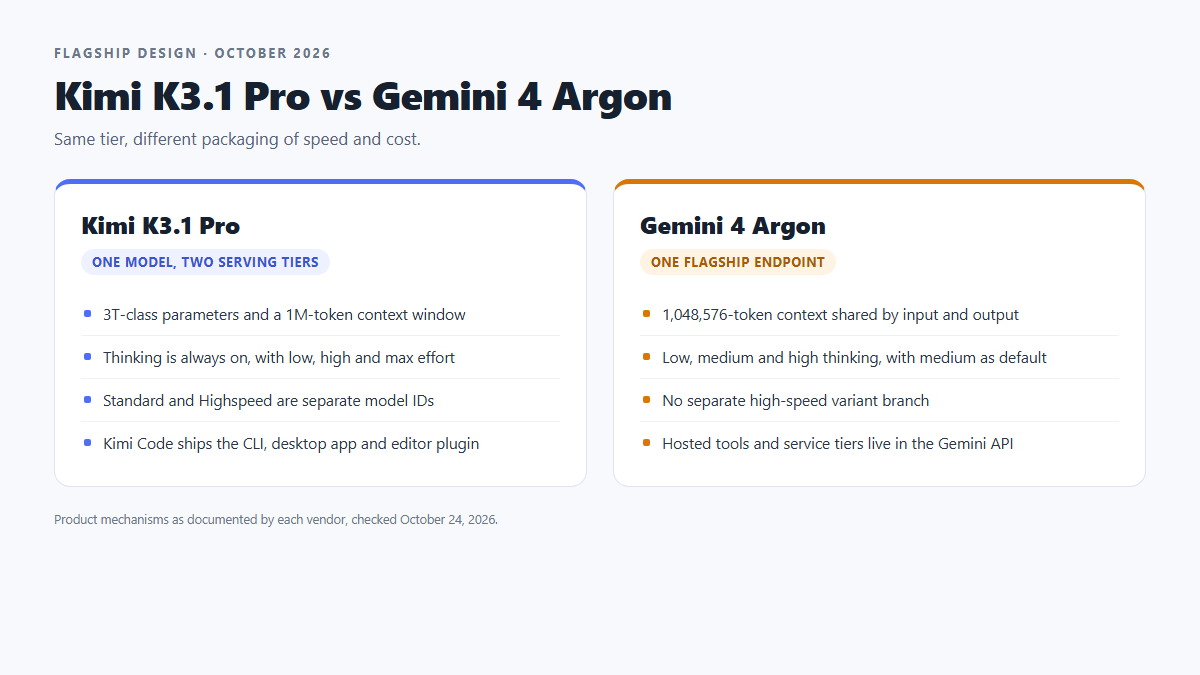
Moonshot released Kimi K3.1 Pro on October 23, 2026. It describes K3.1 Pro as a model in the 3-trillion-parameter class, with a 1M-token context window and a focus on coding, 3D modeling, financial research and long agent tasks. Thinking stays on. You can set the effort to low, high or max, but you cannot disable it.
Google announced Gemini 4 Argon on September 30, 2026, and opened Gemini API access on October 13. Argon is its flagship reasoning model. Its 1,048,576-token context window is shared by input and output. Thinking levels are low, medium and high, with medium as the API default.

| Item | Kimi K3.1 Pro | Gemini 4 Argon |
|---|---|---|
| Vendor | Moonshot AI | |
| Model IDs | kimi-k3.1-prokimi-k3.1-pro-highspeed | gemini-4-argon |
| Positioning | Flagship for coding, 3D work and long agent tasks | Flagship reasoning model for long, multi-step work |
| Context | 1M tokens | 1,048,576 tokens, shared by input and output |
| Open weights | Full weights planned for November 4, 2026; license pending | Not released as open weights |
| Multimodal input | Text, sketches and reference images | Text, images, video, audio and PDF |
| Thinking control | Low, high, max. Cannot be disabled | Low, medium, high. Medium is the default |
| Speed option | A second model ID, Highspeed | No separate high-speed variant |
| API currency | CNY | USD |
| Tool surface | Kimi Code desktop, CLI and editor plugin; MCP and plugins | Gemini API function calling; Search grounding, URL context and code execution |
Argon's default synchronous output limit is 65,536 tokens. Longer output requires its long-decode workflow and still shares the total context window with input. The table describes the vendors' own products and APIs.
How does each model let you pay for speed?
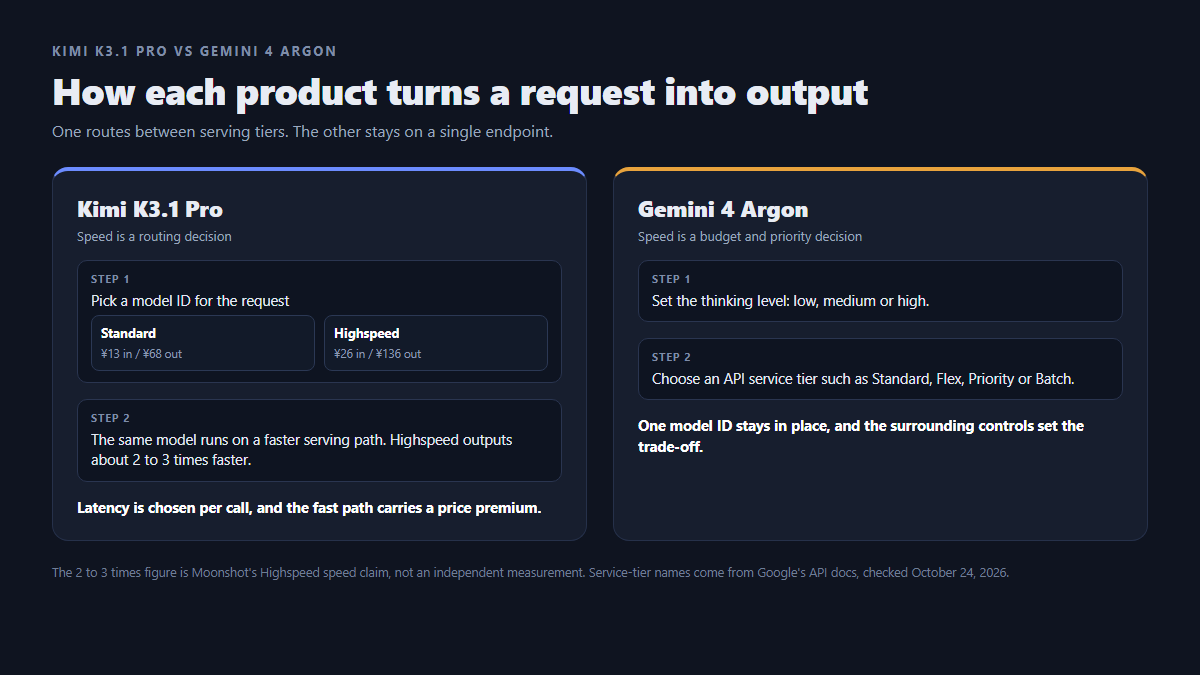
Kimi puts the speed choice in the model ID. kimi-k3.1-pro and kimi-k3.1-pro-highspeed run the same underlying model. Moonshot says the Highspeed serving path produces output about 2 to 3 times faster. Input and output tokens cost twice as much; cached input has the same rate on both.
Argon keeps one model ID, gemini-4-argon. You adjust the thinking level and choose an API service tier. Google lists Standard, Flex, Priority and Batch, each with its own rates and service characteristics. These choices let an application trade time against cost without changing the model ID.
For Kimi, you decide whether a request merits Highspeed. For Argon, you choose a thinking level and a service tier suited to the job. Neither setup, on its own, tells you how quickly a complete agent task will finish.
Who handles the tools and the agent loop?
Kimi Code provides much of the surrounding agent software: a desktop app, a CLI and a VS Code extension. Its runtime includes file, shell, media, web and scheduling tools, alongside MCP servers, plugins, hooks and subagents. The source article also describes support for Responses, chat-completion and message protocols across Kimi's API tooling. Check the endpoint and client you intend to use, since those interfaces need not expose identical features.
With Argon, your application assembles the tool loop through Google's API. Function calling connects your own tools, while hosted tools include Search grounding, URL context and code execution. Argon accepts text, images, video, audio and PDF input.
Kimi Code can save you work if its built-in environment fits your workflow. Argon is a natural fit for an application that already manages tool calls through Google's API. Kimi's direct API remains a separate way to use the model; choosing K3.1 Pro does not require adopting Kimi Code.
How do the API costs compare?
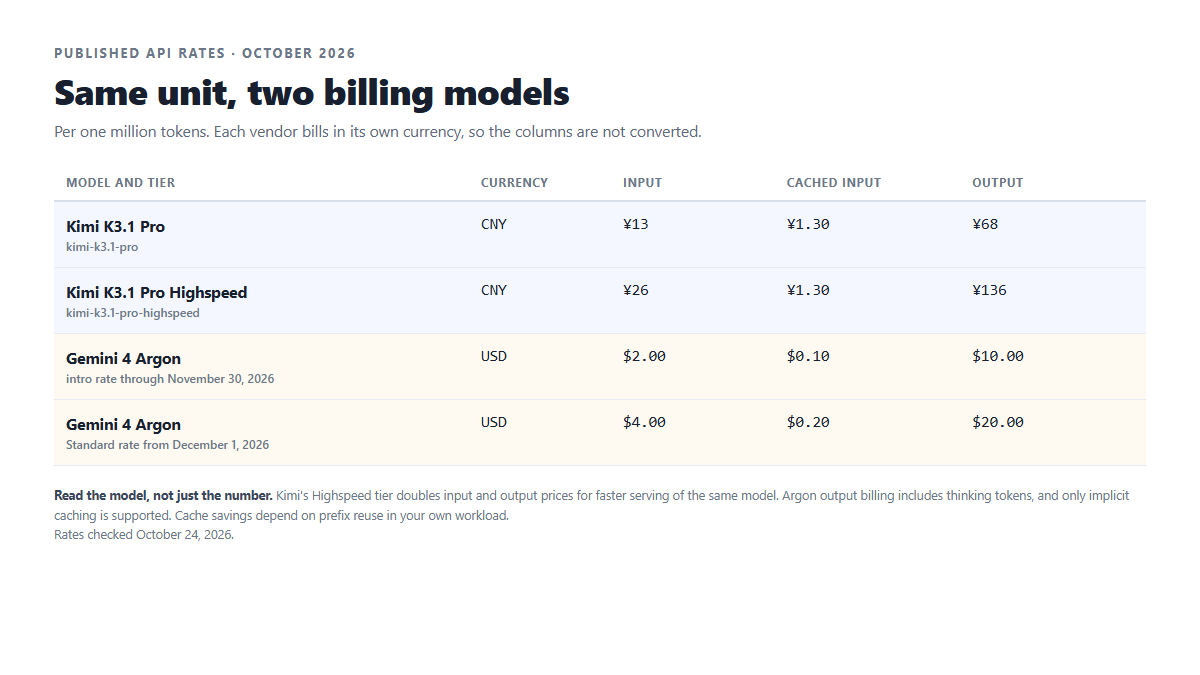
Kimi's CNY rates depend on the model ID. Standard costs ¥13 per million input tokens and ¥68 per million output tokens. Highspeed costs ¥26 and ¥136. Cached input is ¥1.30 for either version. Because thinking stays enabled, a long reasoning run can increase output usage. Within Kimi Code, the 1M context and Highspeed are tied to higher membership tiers. Direct Kimi API usage is billed separately on a pay-as-you-go basis.
Argon's Standard tier costs $2 per million input tokens, $0.10 for cached input and $10 for output through November 30, 2026. On December 1, those rates become $4, $0.20 and $20. Output billing includes thinking tokens, and caching is implicit only. Other service tiers have different token rates; hosted tools may add their own charges.
Start a Kimi estimate with Standard or Highspeed, then account for input, output and cache usage. For Argon, include the chosen service tier and the tokens consumed at your thinking level. Keep the two currencies separate until you apply an exchange rate appropriate to your budget.
| Model and tier | Currency | Input | Cached input | Output |
|---|---|---|---|---|
| Kimi K3.1 Pro | CNY | ¥13 | ¥1.30 | ¥68 |
| Kimi K3.1 Pro Highspeed | CNY | ¥26 | ¥1.30 | ¥136 |
| Gemini 4 Argon, introductory rate to November 30 | USD | $2.00 | $0.10 | $10.00 |
| Gemini 4 Argon, Standard rate from December 1 | USD | $4.00 | $0.20 | $20.00 |
Prices per 1M tokens. These are official vendor rates, not SiAPI.ai prices. Kimi is shown in CNY and Gemini in USD, without currency conversion. The table preserves the original October 24 snapshot; its listed rates were rechecked on October 26, 2026. Cache-hit prices apply only to eligible reused input. Kimi cache writes are billed separately by cache duration and are excluded here.
Which design fits your workload?
Kimi K3.1 Pro is worth considering for interactive coding and agent work where you want to switch speed on individual requests. Kimi Code supplies shell access, file editing and MCP tooling. You can leave routine calls on Standard and use Highspeed for steps where waiting interrupts the person using the application.
Gemini 4 Argon suits applications already using Google's API for document analysis, multimodal input, search-grounded answers or code execution. One model ID can handle lighter and heavier steps through different thinking levels, while your application keeps control of tool orchestration.
If your team does both kinds of work, assess them separately. A background document job and an interactive coding session have different latency needs, even when both require a capable reasoning model.
What should you check before choosing?
For Kimi K3.1 Pro, check the serving tier, reasoning behavior and access route:
- Moonshot says full weights will be released by November 4, 2026. The original October 24 snapshot did not include license terms or hardware requirements.
- Thinking stays on, including for short tasks. Lower effort can reduce the reasoning work, but it does not turn thinking off.
- Highspeed doubles input and output token rates.
- The higher-tier requirements for 1M context and Highspeed apply within Kimi Code. Keep those membership terms separate from direct API billing.
For Gemini 4 Argon, check the pricing period and the full request bill:
- Introductory prices end on November 30, 2026.
- Billed output includes thinking tokens.
- Caching is implicit only; explicit cache creation is not supported.
- There is no separate Highspeed model ID. Latency choices come from thinking levels and service tiers.
- Service tiers change token rates, and hosted tools can add charges.
Before moving a workload
Use a task you already understand. Keep the prompt, tool access and acceptance criteria consistent, then compare the quality of the result, total elapsed time and billed usage. For Kimi, compare Standard with Highspeed at the same effort. For Argon, test the thinking level and service tier you would actually deploy. This is a suggested evaluation, not a benchmark we have run.
To try Kimi K3.1 Pro through SiAPI.ai, see the Coding Plan for current options and limits.