
GLM-5.3 Tiers Compared: Low / High / Max Token & Cost Gap
Published · 6 min read
GLM-5.3 always reasons, and it starts at the heaviest setting. The model ID is glm-5.3, thinking.type only accepts enabled, and reasoning_effort takes low, high or max with max as the default. Send nothing and you pay for max. One million classification calls measured on Z.ai's own endpoint cost $84.60 at low and $533.40 at max, a 6.3x gap that comes from output tokens rather than from the price list.
In this article
Default effort
max, and reasoning cannot be turned off
1M calls at low
$84.60
1M calls at max
$533.40
Cost gap
6.3x, from output tokens
01 / DefaultsWhat does GLM-5.3 use when you do not set reasoning_effort?
It uses max, and you cannot turn reasoning off.
| Parameter | Accepted values | Default | Notes |
|---|---|---|---|
thinking.type | enabled | enabled | disabled returns HTTP 400 on glm-5.3 |
reasoning_effort | low, high, max | max | Anything else is rejected or silently upgraded, see section 04 |
Context is 1,048,576 tokens and a single response can carry 128K output tokens. Z.ai publishes one price list for the family, in USD per 1M tokens:
| Model | Input | Cached input | Output |
|---|---|---|---|
glm-5.3 | $1.40 | $0.26 | $4.40 |
glm-5.3-flash | $0.15 | $0.03 | $0.50 |
The web search tool is billed separately at $0.01 per use.
02 / BillHow much does the default cost on a real batch?
One million classification calls measured on Z.ai's own endpoint cost $84.60 at low and $533.40 at max.
That batch was run at every effort level in August 2026 and the medians are worth keeping:
| Effort | Median output tokens | Cost for 1,000,000 calls |
|---|---|---|
low | 3 | $84.60 |
high | 8 | about $106.60 (computed) |
max | 105 | $533.40 |
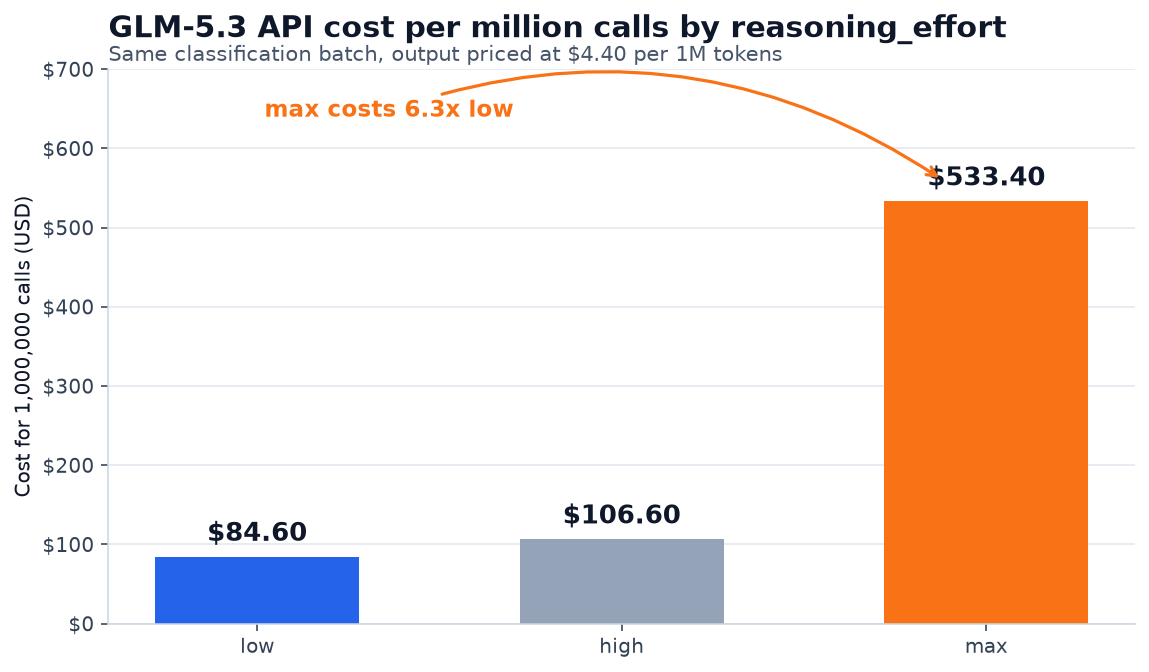
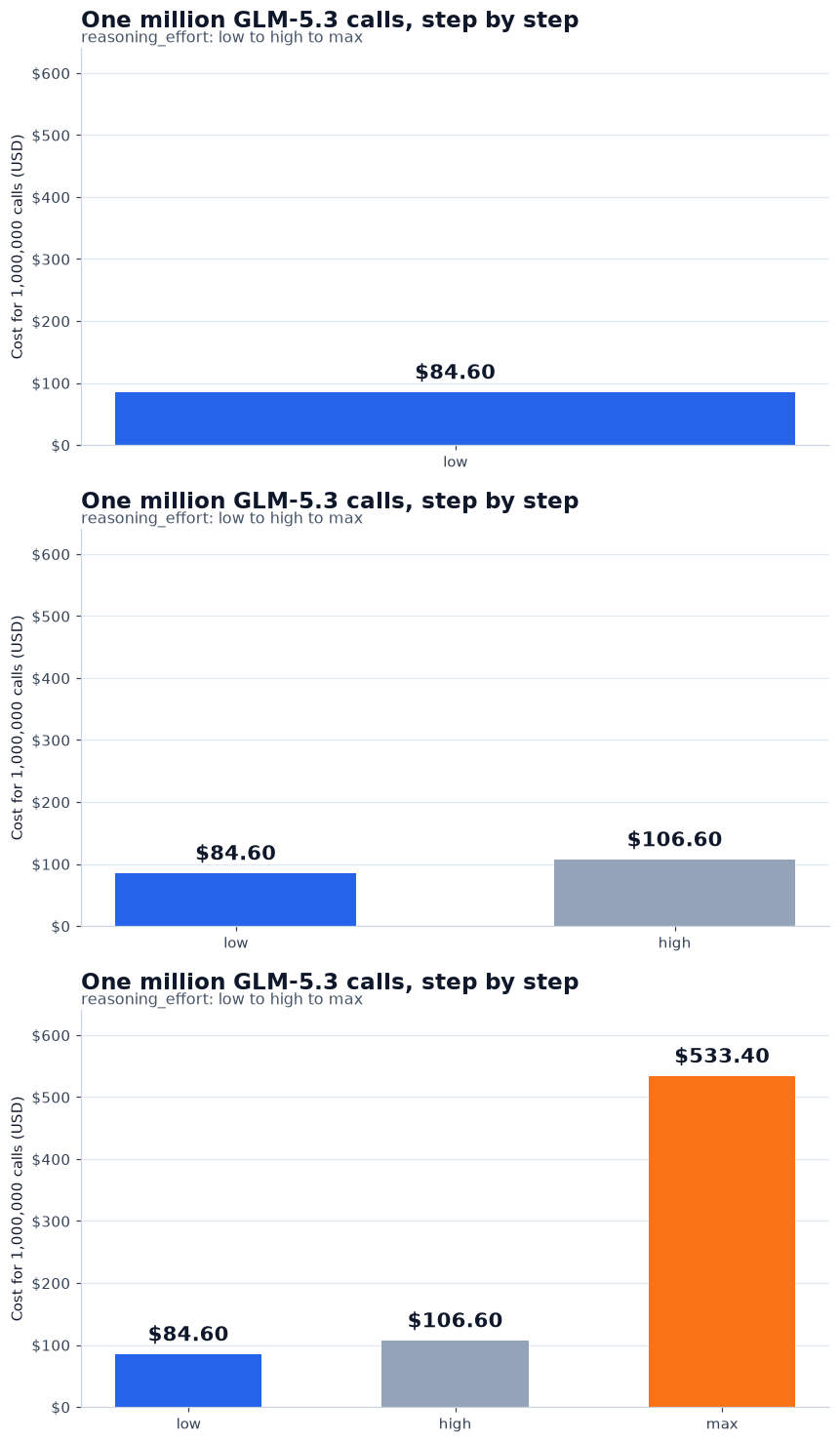
The gap is 6.3x rather than 35x because the 35x figure comes from output tokens alone. 105 tokens at max against 3 at low is the token ratio. Every call also carries the same prompt, and that part of the bill does not move with effort.
The arithmetic works out like this. The fixed input cost in that batch is $71.40 per million calls, which works out to roughly 51 input tokens per call. The remaining money is output. At max the output adds $462.00, for $533.40 in total. At low it adds $13.20, for $84.60 in total.
So the real ratio depends on how much of your prompt sits in front of the answer. A short prompt and a long reasoning chain give you the full 35x. A long prompt and a short answer give you close to nothing.
| Calls per day | low | max | Difference |
|---|---|---|---|
| 10,000 | $0.85 | $5.33 | $4.48 |
| 100,000 | $8.46 | $53.34 | $44.88 |
| 1,000,000 | $84.60 | $533.40 | $448.80 |
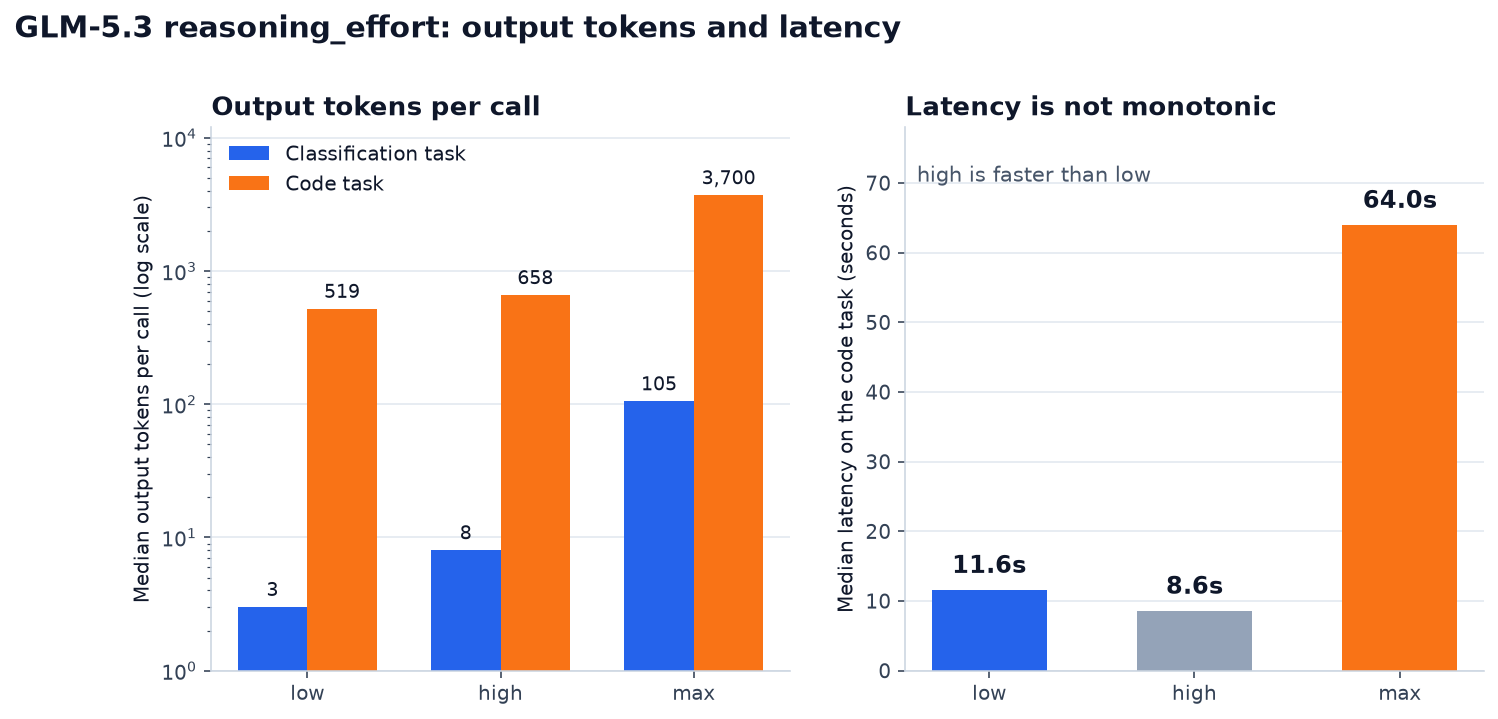
On a code task the same effort levels produce output from a different floor: 519 tokens at low, 658 at high and 3,700 at max. At the $4.40 output rate that is $0.0023 per call at low and $0.0163 per call at max.
03 / SpeedDoes a lower effort level make GLM-5.3 slower?
On the code task, high was faster than low.
| Effort | Median latency | Median output tokens |
|---|---|---|
low | 11.6s | 519 |
high | 8.6s | 658 |
max | 64.0s | 3,700 |
high came back faster than low while producing more output. The model does not follow a dial that trades speed for depth in a straight line, so treating low as the fast option is a guess.
04 / ErrorsWhat happens if you send reasoning_effort: medium?
You get an HTTP 400 on the API and a silent max on self-hosted weights.
| Where you run it | medium or none | Nothing sent | thinking.type: disabled |
|---|---|---|---|
| Z.ai API | HTTP 400 | 200, billed at max | HTTP 400 |
| Self-hosted weights | Silently treated as max | Treated as max | Not available |
The self-hosted behaviour comes from the chat template shipped with the open weights. It accepts low and high and falls back to max for everything else, including medium, an empty string and unknown values. A local deployment that logs its own settings can look perfectly correct while the request runs at the most expensive level.
That is why the API answer and the local answer disagree, and why the error message on the API side is worth reading rather than guessing. Two errors cover most of it: a 400 for thinking.type: disabled and a 400 for an effort value outside the list.
05 / Where max earns itIs max worth it on hard coding work?
On long work that has to survive a reviewer, yes.
On Z.ai's own Code Bench, glm-5.3 at max reached 34.5% completion at roughly 75K output tokens per task, and at high it reached 31.4% at about 50K output tokens. The comparison points for the same bench were Claude Opus 4.8 at 29.5% with 120K tokens and Claude Fable 5 at 39.5% at max.
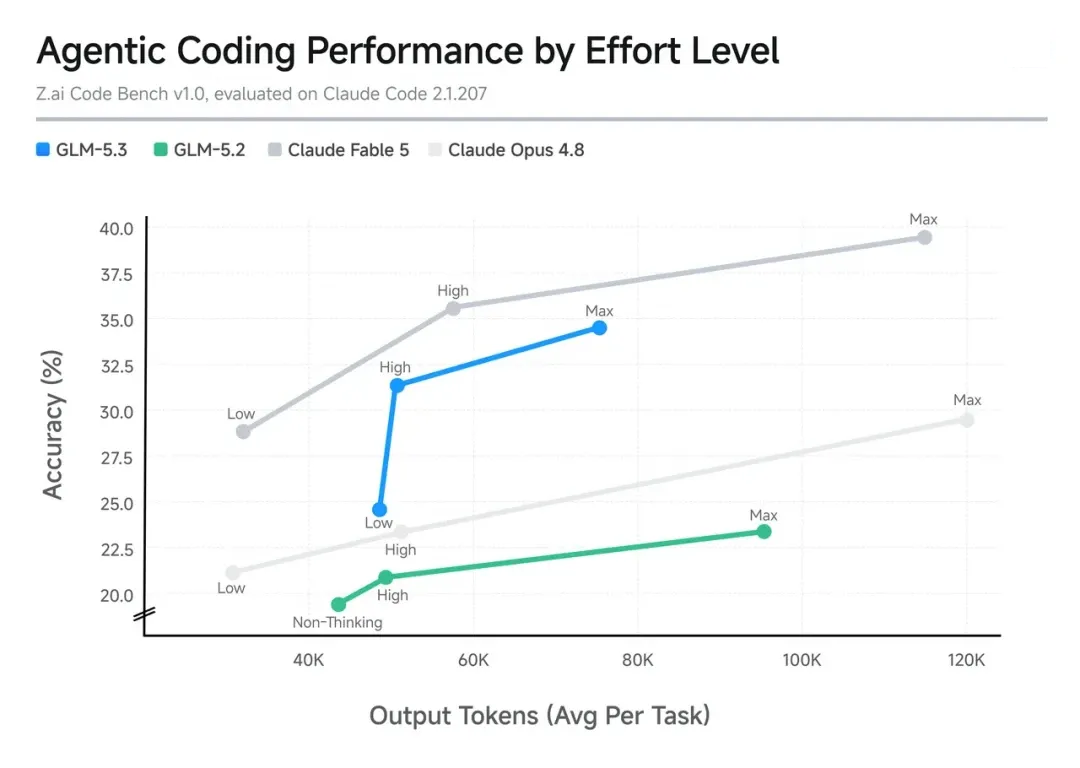
Public benchmarks tell the same story from another angle. glm-5.3 moved from 46.2 to 66.9 on DeepSWE v1.1 and from 4.6 to 28.3 on Terminal-Bench 3.0, and Z.ai runs its own evaluations at max.
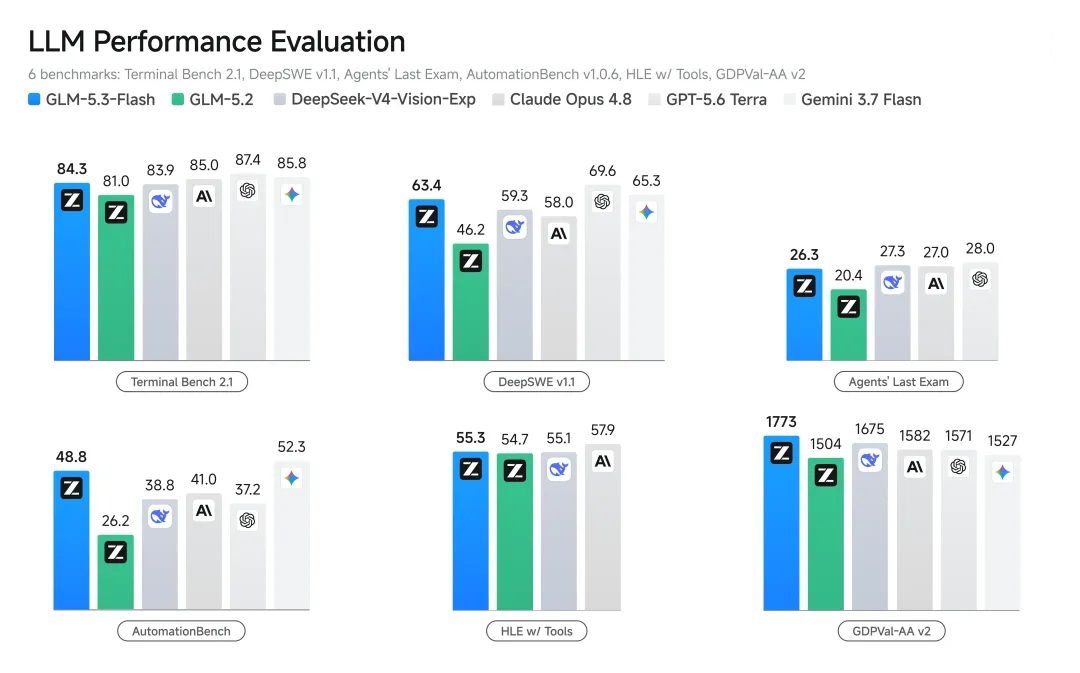
max, so they describe the top of the range rather than the default you get by accident.After running both, this is the split I use: low for classification, extraction and formatting, high for everyday code, and max for work with a reviewer attached, such as a refactor that touches a dozen files.
06 / ToolsDoes GLM-5.3 have native web search and tool calling?
Yes, and the search cost is small next to the token bill.
Z.ai ships web search in three shapes. The Web Search API returns structured results with titles, links, summaries and publication dates. Web Search in Chat adds a web_search tool to a chat completion, so the model retrieves and cites in one call, with filters for domain, recency and result count. The Web Reader takes a URL and returns parsed content. All three also ship as MCP servers for clients that speak that protocol.
Alongside them the model supports function calling, structured output, streaming and context caching. Cached input is $0.26 per 1M tokens against $1.40 for a cold read, so a long system prompt that stays identical between calls costs 81% less on every repeat.
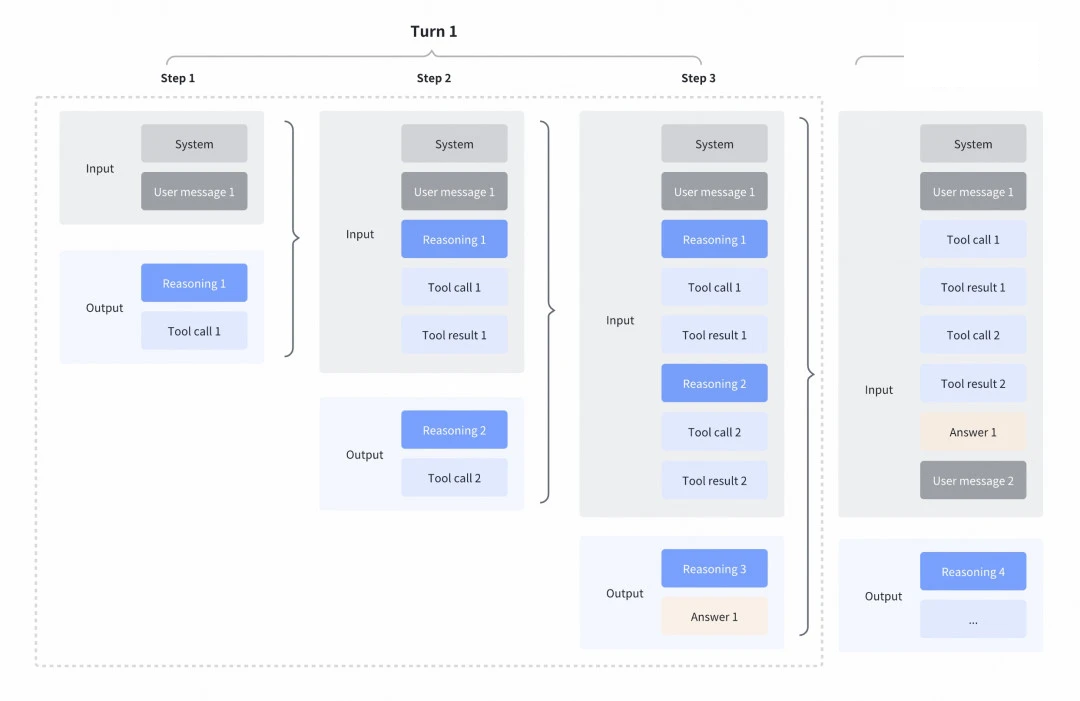
Keeping the reasoning blocks in the history makes that prefix longer, and a longer prefix that stays identical is still cheaper than a cold read. The chat template exposes a clear_thinking flag for this, and it defaults to false. For chat products, pass clear_thinking: true so old reasoning does not keep re-entering the context window.
Set the level yourself
Run glm-5.3 with the effort level under your control and keep the token math visible. See the plans we use for these cost comparisons.
07 / MigrationHow do I switch to glm-5.3 without a surprise bill?
Six steps, in this order.
- Set
reasoning_effortexplicitly on every request, including retries and anything wrapped in a helper library. An unset field is a silentmax. - Audit the retry paths first. A retry that re-reads a long prompt at
maxis where the bill goes to hide. - Send
loworhighfirst and compare the answers on a small sample of real traffic. - Move batch jobs to the off-peak window. Z.ai's Coding Plan charges half the points outside peak hours, and weekends are off-peak all day.
- Check that
thinking.typeisenabledeverywhere. The olddisabledvalue fails the request. - Keep the prompt prefix stable so cached input applies, and decide per endpoint whether to keep or clear reasoning history.
On the API, reasoning_effort is a top level field next to thinking:
curl -X POST "https://api.z.ai/api/paas/v4/chat/completions"   -H "Content-Type: application/json"   -H "Authorization: Bearer $ZAI_API_KEY"   -d '{
    "model": "glm-5.3",
    "messages": [{"role": "user", "content": "Classify this ticket as billing, bug or feature request: ..."}],
    "thinking": {"type": "enabled"},
    "reasoning_effort": "low",
    "max_tokens": 512
  }'
With the OpenAI Python SDK the same field goes through extra_body:
from openai import OpenAI

client = OpenAI(api_key=os.environ["ZAI_API_KEY"], base_url="https://api.z.ai/api/paas/v4")

response = client.chat.completions.create(
    model="glm-5.3",
    messages=[{"role": "user", "content": "Classify this ticket as billing, bug or feature request: ..."}],
    extra_body={"thinking": {"type": "enabled"}, "reasoning_effort": "low"},
)
One note on the Anthropic compatible endpoint. It accepts Anthropic style thinking.budget_tokens, and that field does not map onto GLM's effort levels. If you need an explicit effort level, use the OpenAI compatible endpoint and send reasoning_effort.
08 / FAQQuestions we get asked about the effort level
Is max always the best effort level for GLM-5.3?
No. It is the default and the level behind the published benchmark scores. For classification, extraction and formatting, low produced the right answers at 3 output tokens against 105 at max.
Can I disable reasoning on GLM-5.3?
No. thinking.type only accepts enabled, and disabled returns HTTP 400.
How do I find out which effort level my traffic already uses?
Read the request body your code sends. Anything without an explicit reasoning_effort field is running at max, and the response will not tell you otherwise.
Does reasoning_effort change latency?
It does, but not in one direction. On the code task high was faster than low at 8.6 seconds against 11.6 seconds, while max took 64 seconds.
Does caching change the reasoning_effort decision?
It changes the input side of the bill. Cached input at $0.26 per 1M tokens is much cheaper than a cold read, but the output cost of max is untouched.
If you want to run glm-5.3 against your own traffic with the effort level under your control, the current plans are on our pricing page.